Logo
Assets
The following is the list of official Mooltiverse logo assets.
All assets are available in the master format (SVG) and are also exported to raster formats (i.e. PNG). In order to maximize portability all assets are exported with transparent background.
Assets are also showcased against a white and a black background for demonstration purpos only 1. This, however, only applies to the rendering within this page, while the files available for download from from this page are not affected.
Assets can be downloaded directly from this page and used according to the Guidelines without any further permission.
The logo is available in the horizontal and stacked layouts along with the individual brandmark and wordmark components. Icons are also available for small sizes and low resolution rendering as they use solid colors instead of gradients.
Colors
Official colors for wordmarks are:
| Common Name | Color Code | Sample |
|---|---|---|
| Black | #000000 | |
| White | #FFFFFF | |
| Grey | #808080 | |
| Blue | #0466C8 |
In addition to official colors some variants are also used:
| Common Name | Color Code | Sample |
|---|---|---|
| Pink | #D81B60 | |
| Purple | #8E24AA |
Variants are only to be used when one of the official colors has already been used in the same context and additional items need to be emphasized. Color variants must never be used as official colors.
Full Logo
Horizontal Layout
Official colors:
| Transparent Background | On White Background 1 | On Black Background 1 | |
|---|---|---|---|
| Color Brandmark + Black Wordmark |  | | |
| Grey Brandmark + Black Wordmark |  | | |
| Color Brandmark + White Wordmark |  | | |
| Grey Brandmark + White Wordmark |  | | |
| Color Brandmark + Black Wordmark |  | | |
| Grey Brandmark + Grey Wordmark |  | | |
| Color Brandmark + Blue Wordmark |  | | |
Color variants:
| Transparent Background | On White Background 1 | On Black Background 1 | |
|---|---|---|---|
| Color Brandmark + Pink Wordmark |  | | |
| Color Brandmark + Purple Wordmark |  | | |
Click to expand the available PNG exports
Official colors:
| Height | Transparent Background |
|---|---|
| 200px |  |
| 300px |  |
| 500px |  |
| 1000px |  |
| 200px |  |
| 300px |  |
| 500px |  |
| 1000px |  |
| 200px |  |
| 300px |  |
| 500px |  |
| 1000px |  |
| 200px |  |
| 300px |  |
| 500px |  |
| 1000px |  |
| 200px |  |
| 300px |  |
| 500px |  |
| 1000px |  |
| 200px |  |
| 300px |  |
| 500px |  |
| 1000px |  |
| 200px |  |
| 300px |  |
| 500px |  |
| 1000px |  |
Color variants:
| Height | Transparent Background |
|---|---|
| 200px |  |
| 300px |  |
| 500px |  |
| 1000px |  |
| 200px |  |
| 300px |  |
| 500px |  |
| 1000px |  |
Stacked Layout
Official colors:
| Transparent Background | On White Background 1 | On Black Background 1 | |
|---|---|---|---|
| Color Brandmark + Black Wordmark |  | | |
| Grey Brandmark + Black Wordmark |  | | |
| Color Brandmark + White Wordmark |  | | |
| Grey Brandmark + White Wordmark |  | | |
| Color Brandmark + Black Wordmark |  | | |
| Grey Brandmark + Grey Wordmark |  | | |
| Color Brandmark + Blue Wordmark |  | | |
Color variants:
| Transparent Background | On White Background 1 | On Black Background 1 | |
|---|---|---|---|
| Color Brandmark + Pink Wordmark |  | | |
| Color Brandmark + Purple Wordmark |  | | |
Click to expand the available PNG exports
Official colors:
| Height | Transparent Background |
|---|---|
| 200px |  |
| 300px |  |
| 500px |  |
| 1000px |  |
| 200px |  |
| 300px |  |
| 500px |  |
| 1000px |  |
| 200px |  |
| 300px |  |
| 500px |  |
| 1000px |  |
| 200px |  |
| 300px |  |
| 500px |  |
| 1000px |  |
| 200px |  |
| 300px |  |
| 500px |  |
| 1000px |  |
| 200px |  |
| 300px |  |
| 500px |  |
| 1000px |  |
| 200px |  |
| 300px |  |
| 500px |  |
| 1000px |  |
Color variants:
| Height | Transparent Background |
|---|---|
| 200px |  |
| 300px |  |
| 500px |  |
| 1000px |  |
| 200px |  |
| 300px |  |
| 500px |  |
| 1000px |  |
Wordmark
Official colors:
| Transparent Background | On White Background 1 | On Black Background 1 | |
|---|---|---|---|
| Black |  | | |
| White |  | | |
| Grey |  | | |
| Blue |  | | |
Color variants:
| Transparent Background | On White Background 1 | On Black Background 1 | |
|---|---|---|---|
| Pink |  | | |
| Purple |  | | |
Click to expand the available PNG exports
Official colors:
| Height | Transparent Background |
|---|---|
| 200px |  |
| 300px |  |
| 500px |  |
| 1000px |  |
| 200px |  |
| 300px |  |
| 500px |  |
| 1000px |  |
| 200px |  |
| 300px |  |
| 500px |  |
| 1000px |  |
| 200px |  |
| 300px |  |
| 500px |  |
| 1000px |  |
Color variants:
| Height | Transparent Background |
|---|---|
| 200px |  |
| 300px |  |
| 500px |  |
| 1000px |  |
| 200px |  |
| 300px |  |
| 500px |  |
| 1000px |  |
Brandmark
Brandmark uses color gradients and is well suited for full resolution rendering. Brandmark also uses clear space. Consider using icons for low resolution rendering.
| Transparent Background | On White Background 1 | On Black Background 1 | |
|---|---|---|---|
| Color |  | | |
| Grayscale |  | | |
Click to expand the available PNG exports
| Color and Size | Transparent Background |
|---|---|
| Color 128x128 |  |
| Color 180x180 |  |
| Color 192x192 |  |
| Color 256x256 |  |
| Color 512x512 |  |
| Grayscale 128x128 |  |
| Grayscale 180x180 |  |
| Grayscale 192x192 |  |
| Grayscale 256x256 |  |
| Grayscale 512x512 |  |
Icon
Small size icons (up to 64x64 pixels) use solid colors to avoid pixelization in low resolution renderings, while bigger icons (128x128 pixels and above) use gradient colors. Icons do not use clear space, which can be customized depending on the use (favicons, buttons, notifications etc). Consider using brandmarks for full resolution rendering or regular use in web sites.
| Transparent Background | On White Background 1 | On Black Background 1 | |
|---|---|---|---|
| Solid Color |  | | |
| Gradient Color |  | | |
| Solid Grayscale |  | | |
| Gradient Grayscale |  | | |
Click to expand the available PNG exports
| Color and Size | Transparent Background |
|---|---|
| Color 16x16 |  |
| Color 24x24 |  |
| Color 32x32 |  |
| Color 48x48 |  |
| Color 64x64 |  |
| Color 128x128 |  |
| Color 180x180 |  |
| Color 192x192 |  |
| Color 256x256 |  |
| Color 512x512 |  |
| Grayscale 16x16 |  |
| Grayscale 24x24 |  |
| Grayscale 32x32 |  |
| Grayscale 48x48 |  |
| Grayscale 64x64 |  |
| Grayscale 128x128 |  |
| Grayscale 180x180 |  |
| Grayscale 192x192 |  |
| Grayscale 256x256 |  |
| Grayscale 512x512 |  |
Clear Space
| Specification | |
|---|---|
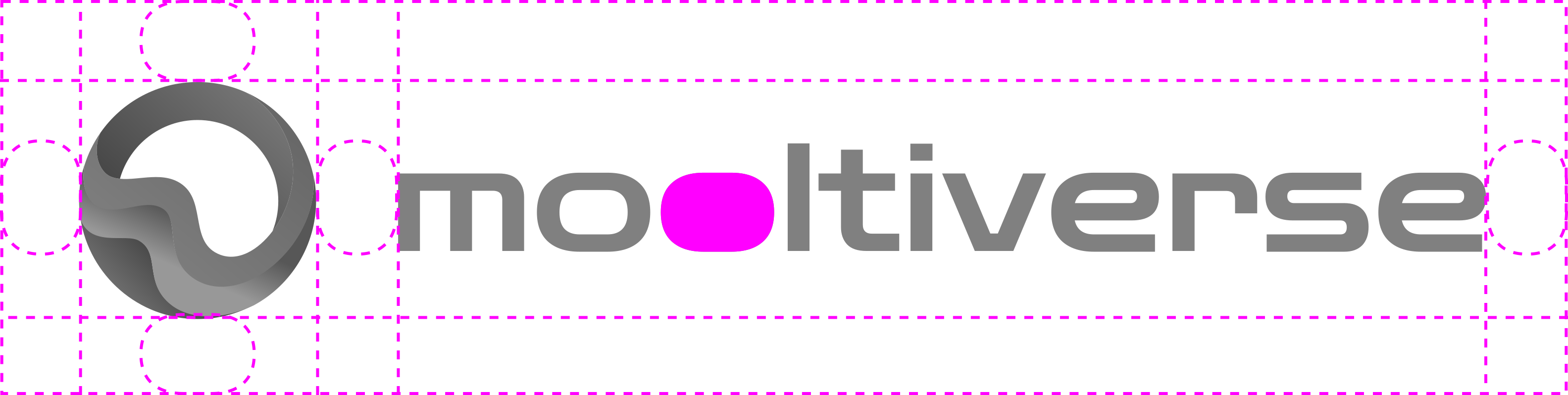 | The outer clear space around the horizontal logo is equal to the height of the letter o on all sides. The same clear space is also between the brandmark and the wordmark. Alignments and proportions are described in the geometry section. |
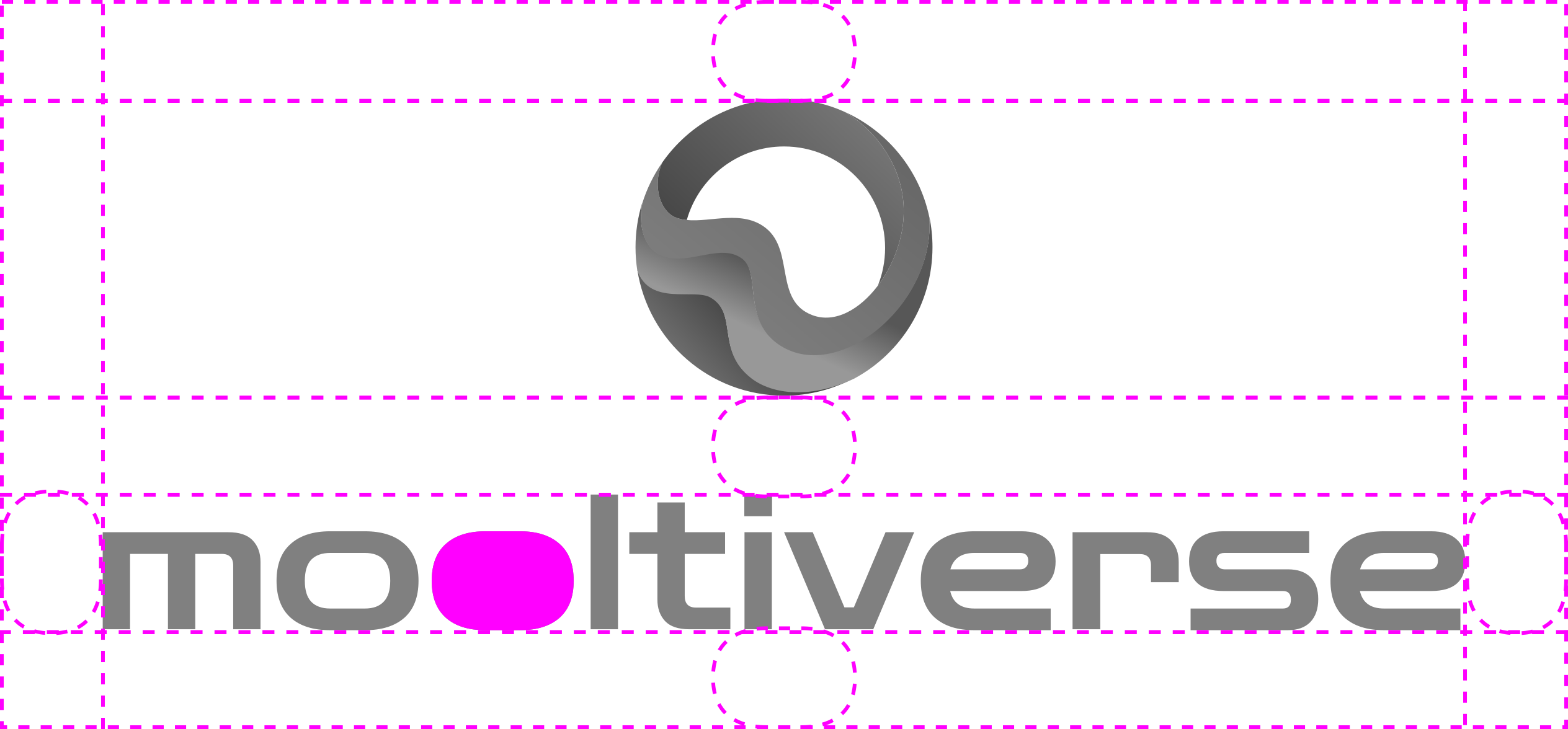 | The outer clear space around the stacked logo is equal to the height of the letter o on all sides. The same clear space is also between the brandmark and the wordmark. Alignments and proportions are described in the geometry section. |
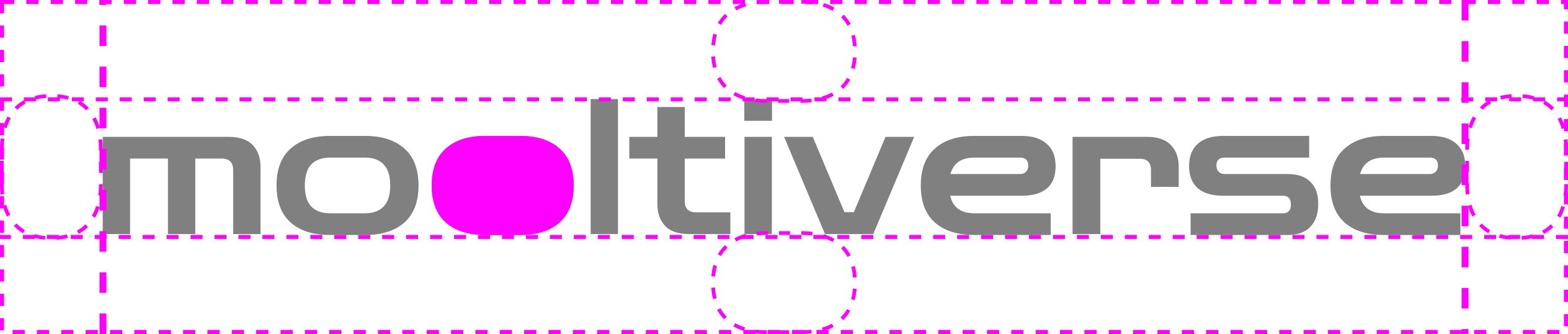 | The clear space around the wordmark, when used alone, is equal to the height of the letter o on all sides. |
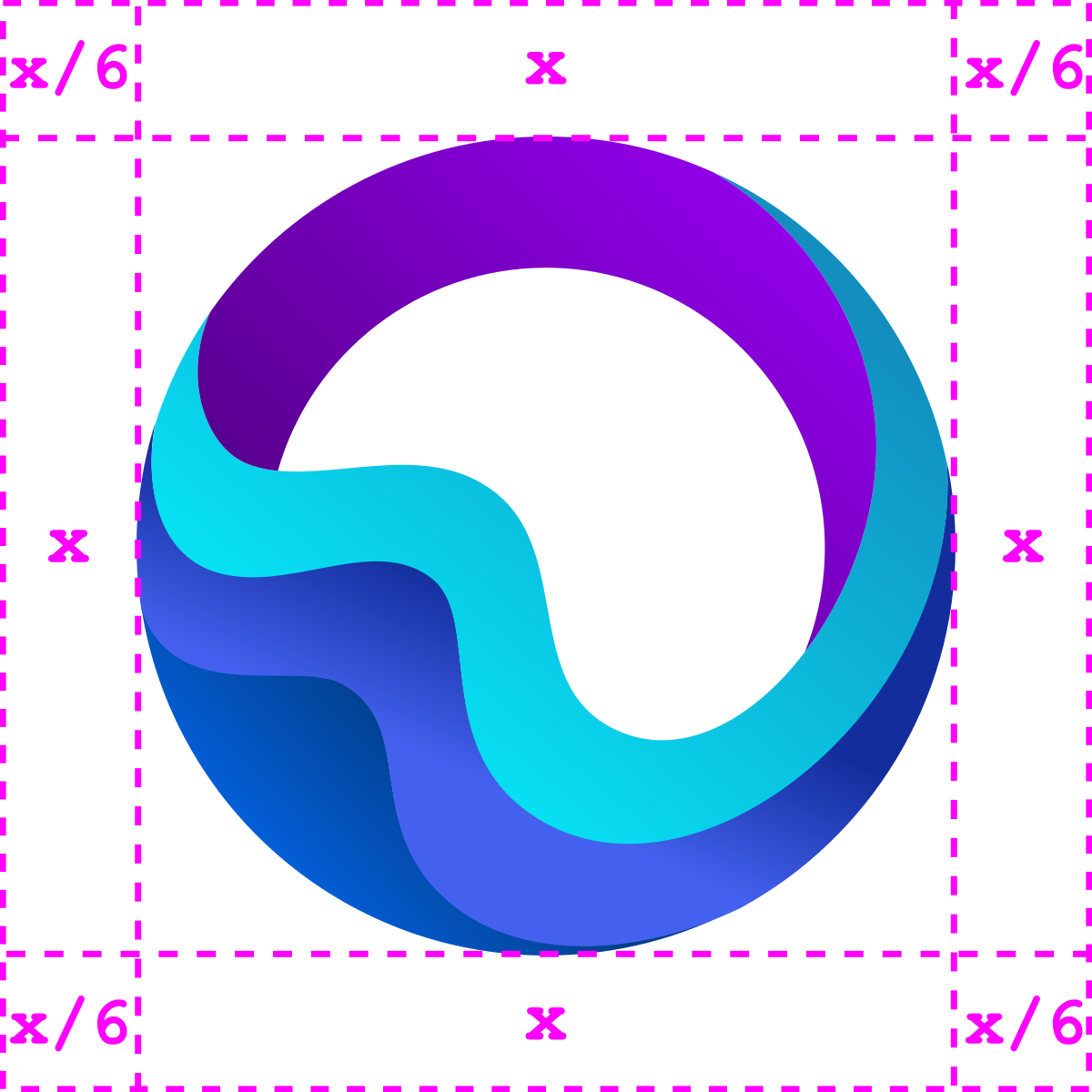 | The clear space around the brandmark, when used alone, is 1/6 of the symbol. For example: with a 900x900px symbol, the clear space is 150px on all sides. |
Icons can be used with no clear space as they're often used alone in smaller sizes or lower resolution contexts (i.e. favicons, buttons etc.). Although icons exported by this kit have no clear space, designers may add some extra space for improved appearance in specific contexts.
Geometry
| Specification | |
|---|---|
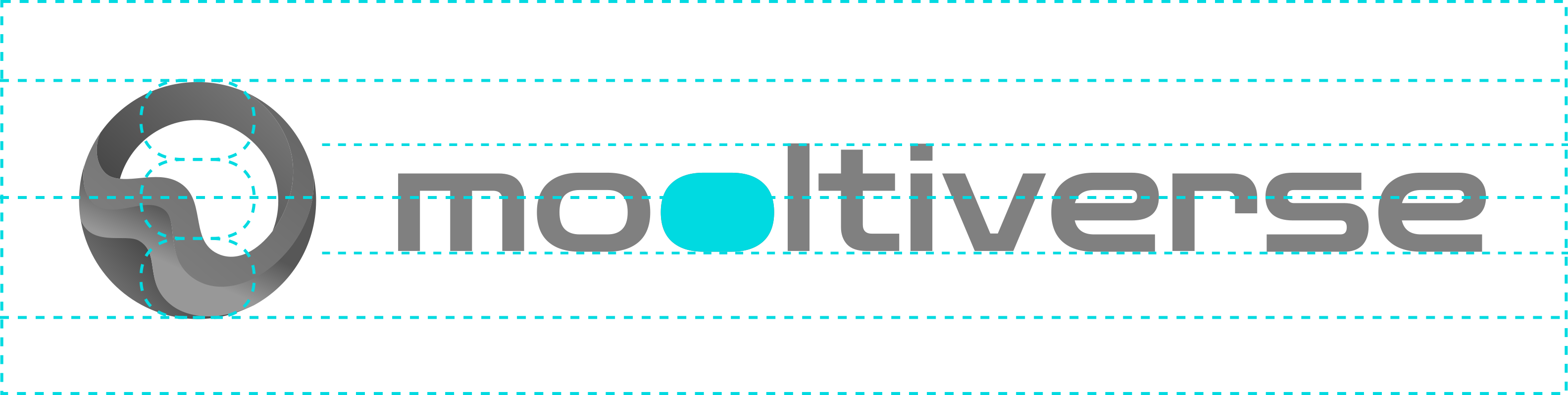 | In the horizontal logo layout, the brandmark height and width must be 3 times the height of the letter o of the wordmark. The brandmark and the wordmark must be centered on the same horizontal axis, with the brandmark on the left and the wordmark on the right side. |
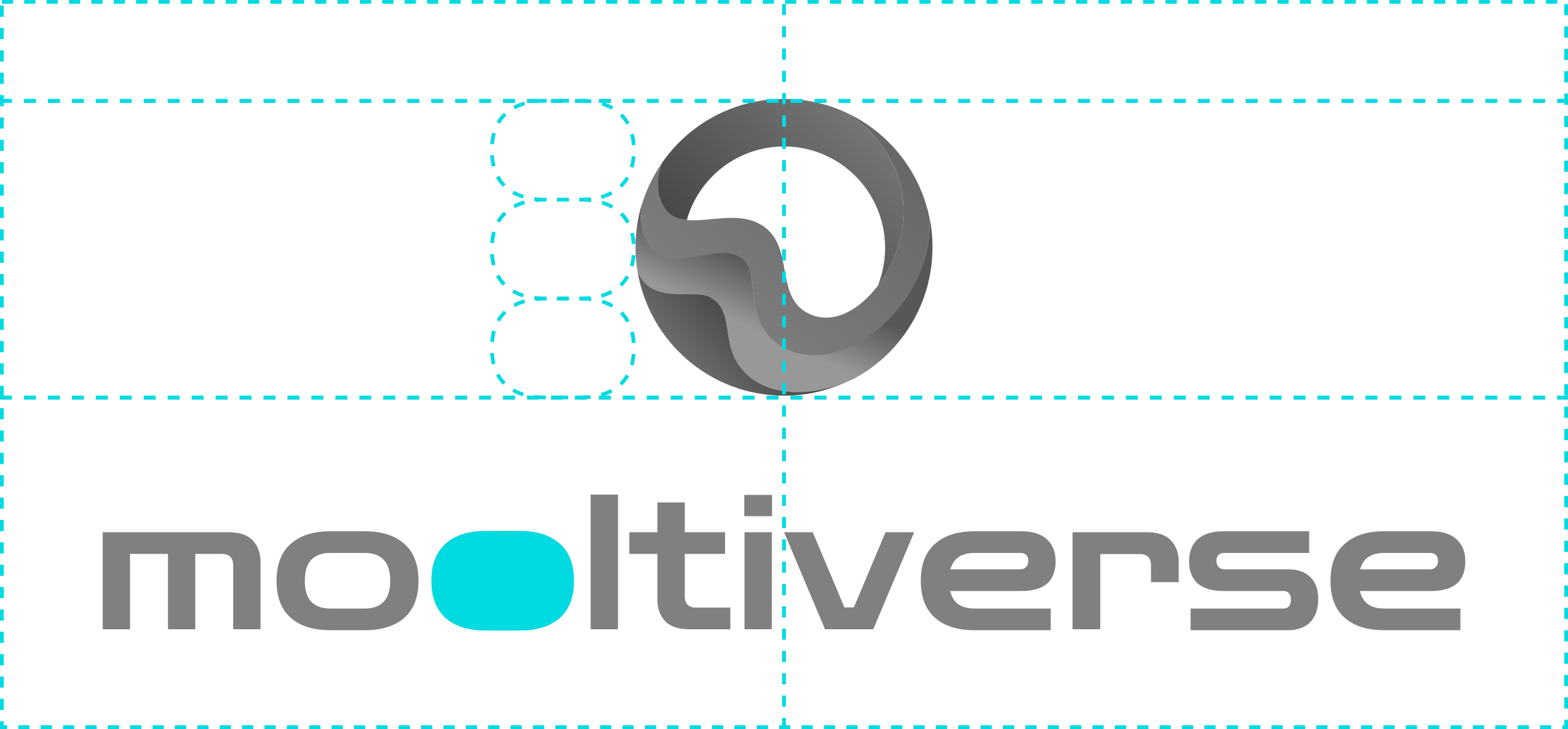 | In the stacked logo layout,the brandmark height and width must be 3 times the height of the letter o of the wordmark. The brandmark and the wordmark must be centered on the same vertical axis, with the brandmark on top and the wordmark on the bottom. |
Typography
The wordmark uses the Zen Dots font without any customization.
Guidelines
- do not change the text
- do not change colors or gradients
- do not stretch, squeeze, flip or rotate
- do not apply effects
- do not use old versions
- do not use on busy backgrounds
- do not create custom versions
- use monotone versions only when color is not an option